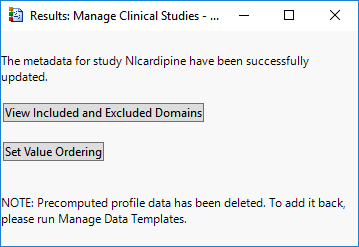
Use this feature to refresh the current study’s metadata. Study metadata includes study domains, value ordering presets, etc. A study refresh ensures that the study metadata has been processed on the most recent copy of study data on the most recent version of JMP Clinical. This operation is required when upgrading to a newer major JMP Clinical version (e.g., 19.x -> 20.x).
A study refresh causes the following to occur:
•
Snapshot number is reset to '0'.
•
Patient Profile Data is deleted.
•
Derived Population Flag data is deleted.
Refreshing the study does not impact:
•
Any options set during Add Study (e.g., SDTM and ADaM paths and selected domains, 'Advanced' options). These are carried over, to the extent possible.
•
Value Order and Color settings. These are carried over, to the extent possible. When new study data is introduced (e.g., domains, variables, values), a notice is printed on the study refresh completion message Set Value Order and Color in Studies...dialog, encouraging users to review their settings in light of the new data.
•
Study Preferences. These are carried over, to the extent possible.
•
Study Notes. These are carried forward, with a new note added for the study refresh operation itself.
•
Previously generated report data is not refreshed. When a JMP Clinical report is run, a subfolder is created under C:\Users\<username>\OneDrive - SAS\Documents\JMPClinical<version number>\<configuration name>\Output\<study name>. This subfolder is automatically deleted when the report (Review Builder session) is closed, so the Refresh action has no effect on these subfolders.
•
Saved Static Reports or Saved Filters. These remain unaffected.
 to refresh the metadata from the selected study.