Select the analysis population

Use the drop-down menu to select the set of individuals to include in the analysis.
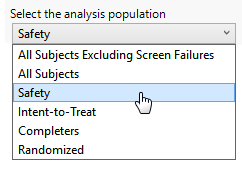
This list is populated with available populations that can be defined for the current Study based on flags found in the ADSL, ADDM, or DM (and optionally SUPPDM) data sets. Possible populations are listed in the following table:

Select this population:

Note: One or more of these options may not be available, depending upon the report you are running.


When you want to include:

All Subjects Excluding Screen Failures

All of the subjects in the study, excluding screen failures.

Subjects with values Screen Failure in either ARM or ACTARM, or SCRNFAIL in either ARMCD or ACTARMCD are considered screen failures.

Note: Values indicating screen failure must be specified exactly as listed. Refer to How is JMP Clinical affected by localization-specification? for exact specifications in all languages supported by JMP Clinical.

All Subjects

All of the subjects in the study, including screen failures.

Safety

All subjects with a “Yes” value (either “Y” or “1”, depending on whether character or numeric flags are used) in the Safety population flag (SAFFL or SAFETY) variable.

Note: This is the default selection if the population exists.

Full Analysis Set

All subjects with a “Yes” value (either “Y” or “1”, depending on whether character or numeric flags are used) in the Full Analysis Set population flag variable (FASFL or FULLSET).

Intent-to-Treat

All subjects with a “Yes” value (either “Y” or “1”, depending on whether character or numeric flags are used) in the Intent-to-Treat population flag (ITTFL or ITT) variable.

Per-Protocol

All subjects with a “Yes” value (either “Y” or “1”, depending on whether character or numeric flags are used) in the Per-Protocol population flag (PPROTFL or PPROT) variable.

Completers

All subjects with a “Yes” value (either “Y” or “1”, depending on whether character or numeric flags are used) in the Completers population flag (COMPLFL, COMPLETED, or COMPLT) variable.

Randomized

All subjects with a “Yes” value (either “Y” or “1”, depending on whether character or numeric flags are used) in the Randomized population flag (RANDFL, RANDOMIZED, or RANDOM) variable.

Enrolled

All include subjects with a “Yes” value (either “Y” or “1”, depending on whether character or numeric flags are used) in the Enrolled population flag (ENRLFL, ENROLLED, or ENRL) variable.