Duration Time Window Method

Use the radio buttons to choose the method for determining the time s to consider during analysis of exposure duration.
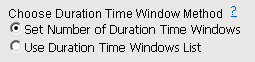
Available methods are described in the following table:

Method for Determining Time Points

Definition

Set Number of Duration Time s

• Select this option to divide the total exposure period into intervals of equal length. The number of intervals is specified using the Number of Duration Time Windows field or slider.
• All observations taken within an interval are plotted together.
• The final report lists the number of patients that fall into each of exposure.

Use Duration Time s List

• Select this option to plot observations taken during specific time points during the trial period. Time s are specified as a list in the Duration Time Windows field.
• All observations taken within an interval are plotted together.
• The final report lists the number of patients that fall into the specified s of exposure only.

To Specify the Method Used for Determining Time Points:

8 Click the radio button corresponding to the time frame that you want to use.